
Sony’s Custom Grid Line
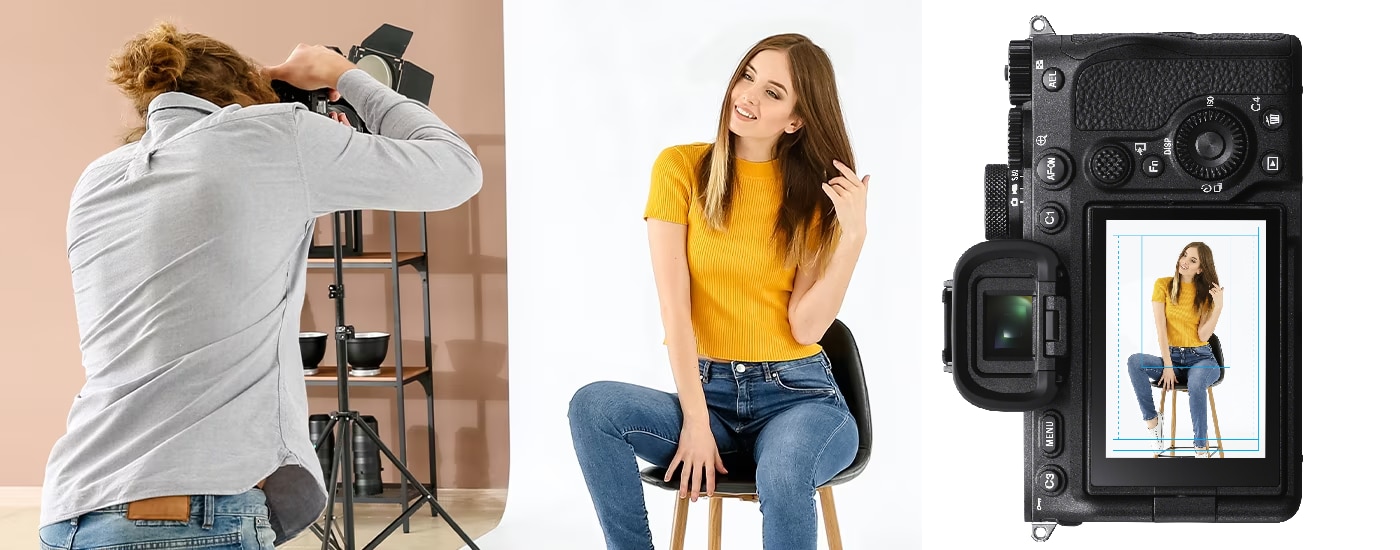
The Custom Grid Line allows users to create personalised lines, graphics, and markers for preview overlay on the electronic viewfinder (EVF) or LCD screen. Whether you’re a solo shooter or a team, in studio or in the field, they ensure accurate composition for every shot. You can switch between up to four different overlay presets on each compatible camera, tailoring the camera’s display to suit individual needs or specific photographic scenarios.
How to purchase
Help Guide for Custom Grid Line is here
Update your camera
Make sure the camera is compatible with Custom Grid Line, and updated to the supported version.

Purchase Licence
Purchase and download a Custom Grid Line licence.
Grid Line Step up
- Activate your Custom Grid Line licence
- Create your Custom Grid Line preset/s
- Import to your licenced camera
Usability
Custom Grid Line feature is supported on a range of Alpha cameras, and complete colour and graphic customisation, for distinct and efficient composition guidance. The overlays are available on both EVF and LCD screens as well as the HDMI output, so they’re ideal for use with external monitors or recorders and the precise framing confidence of a larger screen preview. They can also be enabled in playback mode, allowing photographers to quickly review and confirm the image composition before moving on, for consistent quality and time saving post workflows.
Step 1: Check your camera is compatible and updated
Update your camera here

Step 2: Purchase the Licence
*As of August 2024, the purchase site has been changed to Creators’ Cloud Website from Sony Professional ID. Please follow the directions as below.
*For information on compatible cameras, please refer to the licence purchase page
*Availability depends on countries and regions.
1. Download your licence from here:
2. Click [Sign in and upgrade].
* Sign in with your Sony account or create your Sony account if you don’t have an account yet.
3. Click [Purchase licence]. If a dialog box appears, confirm the message and click [OK].
4. When the next dialog box appears, confirm the message and click [OK] to move to Cleverbridge, Inc.’s website.
5. Enter the required information on the cart page and click [Next].
6. Make sure your order details and click [Buy Now] to complete payment.
7. Click [Creators’ Cloud] to return to the licence download page.
8. The purchased licence will be listed in the licence list. Click [Enter your camera information].
9. Select your camera from the dropdown menu.
10. Enter your camera’s serial number (7-digit) and click [OK].
11. If a dialog box appears, confirm the message and click [OK].
12. Click [Download licence].
* After purchase, a payment e-mail will be sent to you.
Step 3: Setup Custom Grid Line
1. Save the licence file you downloaded to your memory card, and insert the memory card in slot 1 to activate the licence.
2. Create your own grid line using a commercially available graphic design tool. Follow the instructions below:
- File size: 256 KB or less
- Resolution: 640 x 480 pixels or less
- File system: exFAT/Line color mode: RGBA
3. Save grid line file to SD Card/CFexpress Type A Card. Create a new folder as follows:
- For SD Cards: /PRIVATE/SONY/PRO/GRIDLINE
- For CFexpress cards: /SONY/PRO/GRIDLINE
4. Insert the memory card in either of the card slots.
5. MENU → [Shooting] → [Shooting Display] → [Grid Line Type].
6. Scroll down to [Custom1] – [Custom4] and select [Import].
7. Select the card slot you inserted and select the grid line.
8. Click [OK].
Help Guide for Custom Grid Line is here

Easy setup for custom grid and crop lines with Custom Gridline Generator for free
Custom grid line presets can be easily produced in most graphics editors. We also offer a Custom Gridline Generator (CGG)* PC application for Volume Photography customers, allowing user-friendly grid and crop line customisation for your needs.
With CGG, users can select a shooting angle, draw lines and shapes in any color and level of opacity, and create crop lines for any aspect ratio. Additionally, users can import previously captured images into CGG to use as a references for creating grid and crop lines at precise positions. Your preset can then be easily accessed on any licenced camera by storing it on an SD / CFexpress memory card.


